Aircraft Tracking Modes Explained
This page explains the three core surveillance modes commonly seen on an aircraft tracking station: ADS-B, Mode S and MLAT. Use the buttons above to switch between them and see how each one works, what data it provides, and how it appears inside an Airradar-style receiver setup.
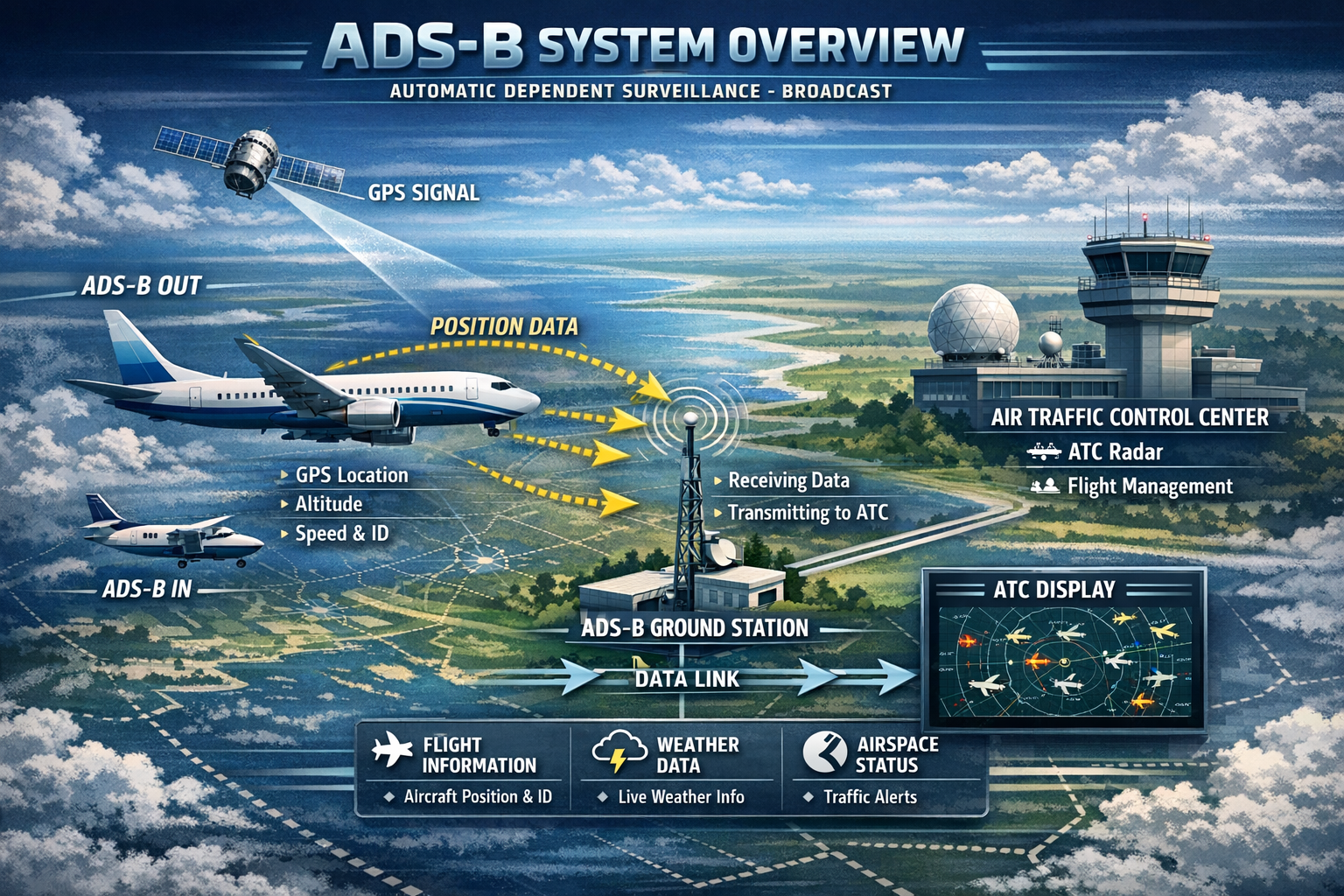
What ADS-B Is
ADS-B stands for Automatic Dependent Surveillance–Broadcast. It is a surveillance technology where the aircraft calculates its own position from onboard satellite navigation and then broadcasts that information repeatedly for anyone with a compatible receiver to decode.
In practical terms, this means the aircraft is not waiting to be asked where it is. It is proactively telling the world: “this is my position, altitude, speed, track and identity.”
Why it is so useful
- It provides precise position updates directly from the aircraft.
- It can be received by ATC systems, airline infrastructure and hobby stations.
- It is ideal for real-time map displays such as Airradar.
- It usually gives the richest information of the three modes on this page.
Signal Flow
What You Can See
- ICAO hexadecimal address
- Callsign or flight number
- Latitude and longitude
- Barometric and sometimes geometric altitude
- Ground speed and vertical rate
- Track / heading information
- Status fields depending on avionics capability
How It Fits Into Airradar
For a typical home station, the chain looks like this:
1090 MHz antenna → SDR receiver → decoder (Dump1090 / similar) → aircraft data feed → Airradar web interfaceThat is why ADS-B is the backbone of most hobby radar pages: it is direct, rich in information, and easy to visualize.
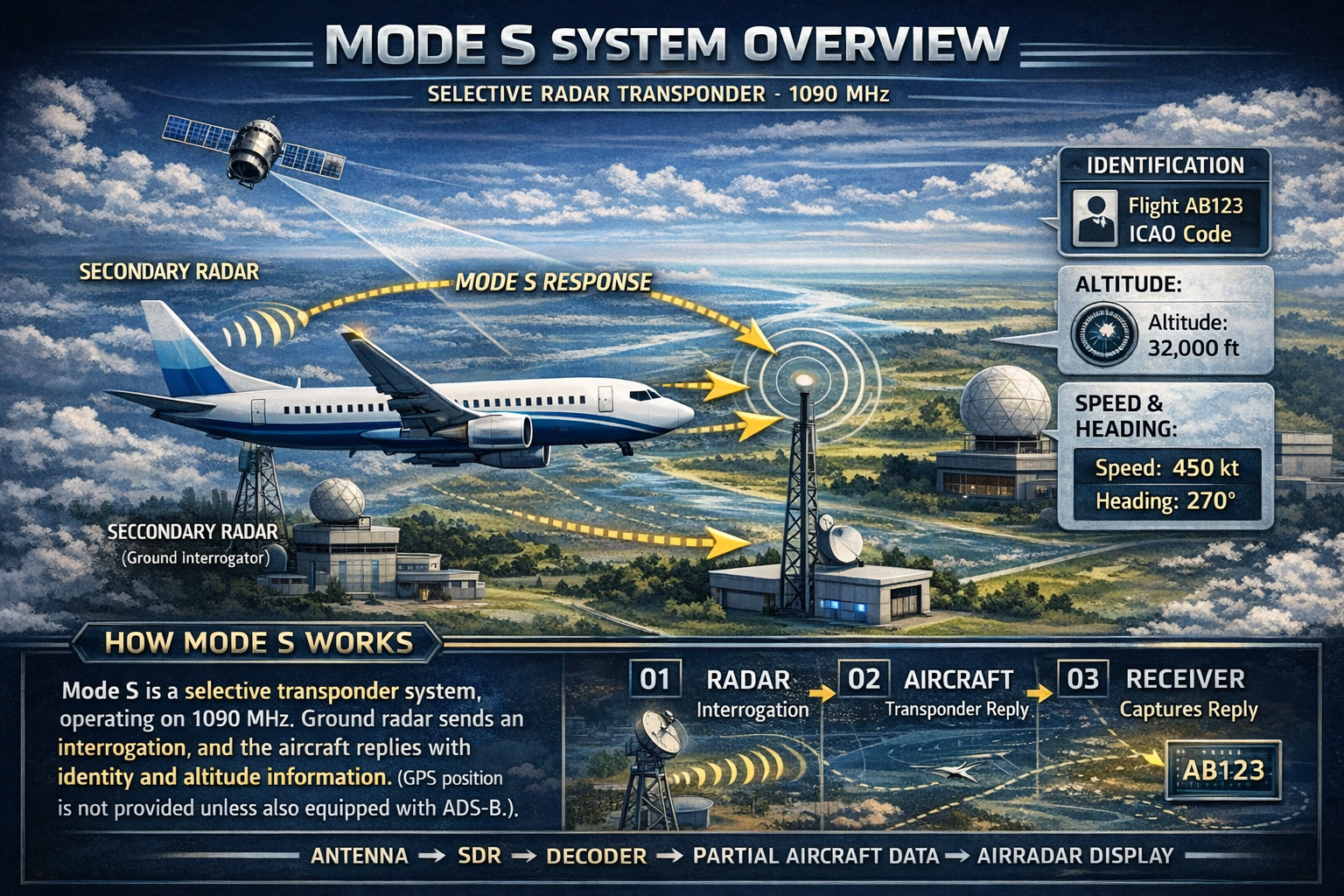
What Mode S Is
Mode S is a transponder system used by aircraft to respond to interrogations from radar and other surveillance systems. The “S” stands for Select, because the aircraft can be selectively addressed using its unique 24-bit ICAO address.
Unlike ADS-B, plain Mode S does not automatically broadcast full position data by itself. It mainly sends identity and other transponder-related replies when interrogated, although some messages can still reveal useful information to tracking software.
Typical data available
- ICAO hex address
- Squawk code
- Pressure altitude in many cases
- Sometimes callsign or limited status data
- No direct latitude/longitude unless ADS-B is also present
How It Works
Why Mode S Matters
Mode S is important because it lets your station detect aircraft that are visible on the radio side but are not providing full ADS-B positional broadcasts. In other words, it expands awareness beyond “only aircraft with direct GPS coordinates.”
On an Airradar-style interface, Mode S traffic may appear with reduced detail compared with ADS-B aircraft. You might see the ICAO address, altitude or callsign, but not a precise plotted route unless another method—such as MLAT—derives position.
Mode S in a Home Station
Antenna → SDR → decoder receives replies → partial aircraft data → Airradar list / alert / metadata viewThis is especially useful for military, business or legacy traffic where position messages may be absent, restricted or intermittent.
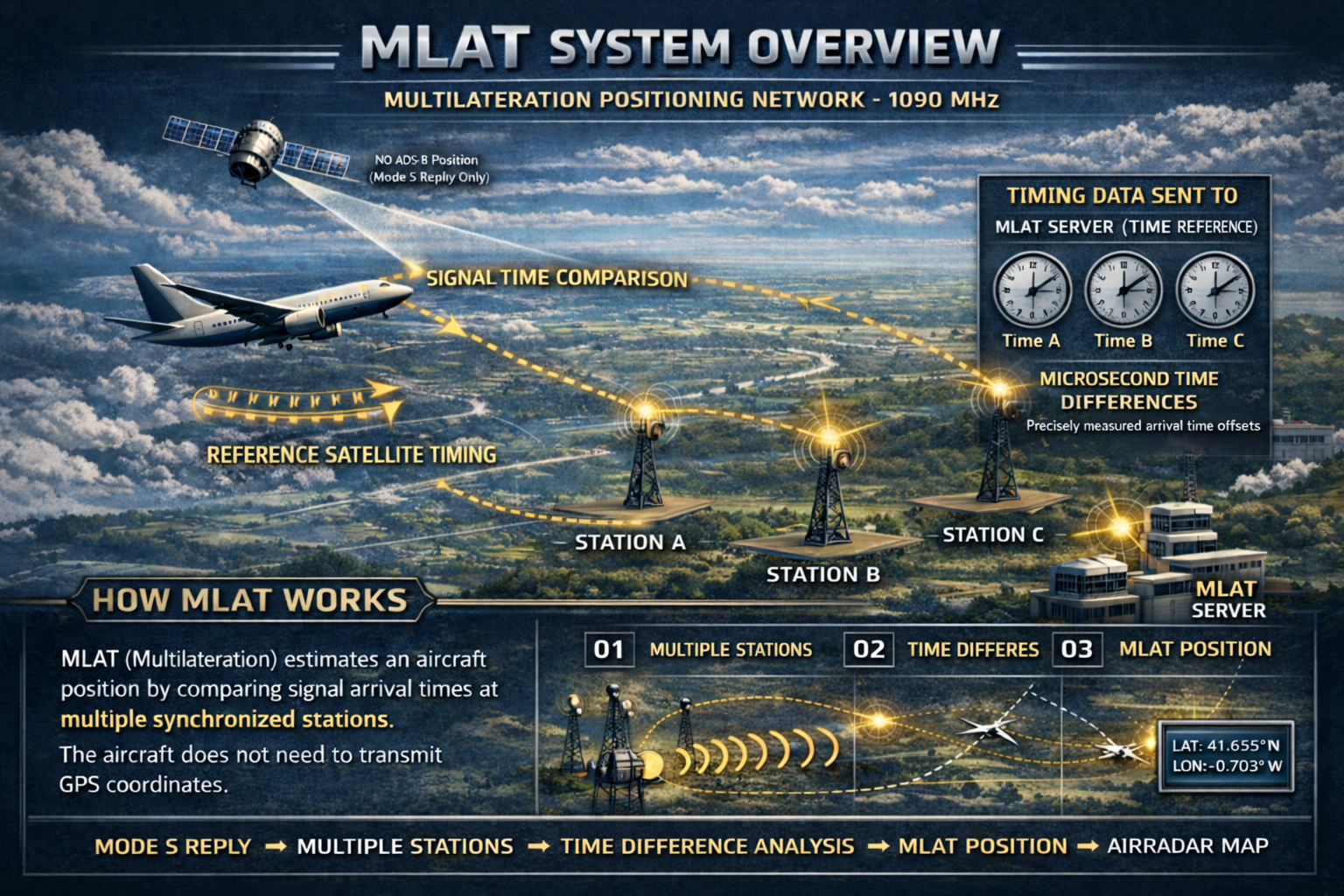
What MLAT Is
MLAT stands for Multilateration. It is a technique used to estimate an aircraft position by comparing the exact arrival time of the same transponder signal at multiple receiving stations.
This means the aircraft does not have to broadcast its own coordinates. Instead, the network figures out the position from timing differences between geographically separated receivers.
Why MLAT exists
- It can provide a position for aircraft that transmit Mode S replies but no ADS-B coordinates.
- It turns a network of synchronized receivers into a location engine.
- It fills some gaps where direct ADS-B position is unavailable.
How MLAT Works
MLAT Strengths and Limits
- Strength: gives positions for some non-ADS-B aircraft.
- Strength: uses the power of a shared receiver network.
- Limit: needs several synchronized stations hearing the same target.
- Limit: accuracy depends on geometry, timing quality and station distribution.
- Limit: it is network-dependent, not purely local in the same way ADS-B is.
How It Appears in Tracking Pages
In many tracking systems, MLAT-derived aircraft are marked differently from direct ADS-B targets because the position is calculated by the network, not transmitted by the aircraft itself.
Aircraft Mode S reply → multiple network stations hear it → timing server computes position → map displays MLAT trackFor users, the big idea is simple: MLAT helps put a dot on the map for aircraft that would otherwise remain positionless.